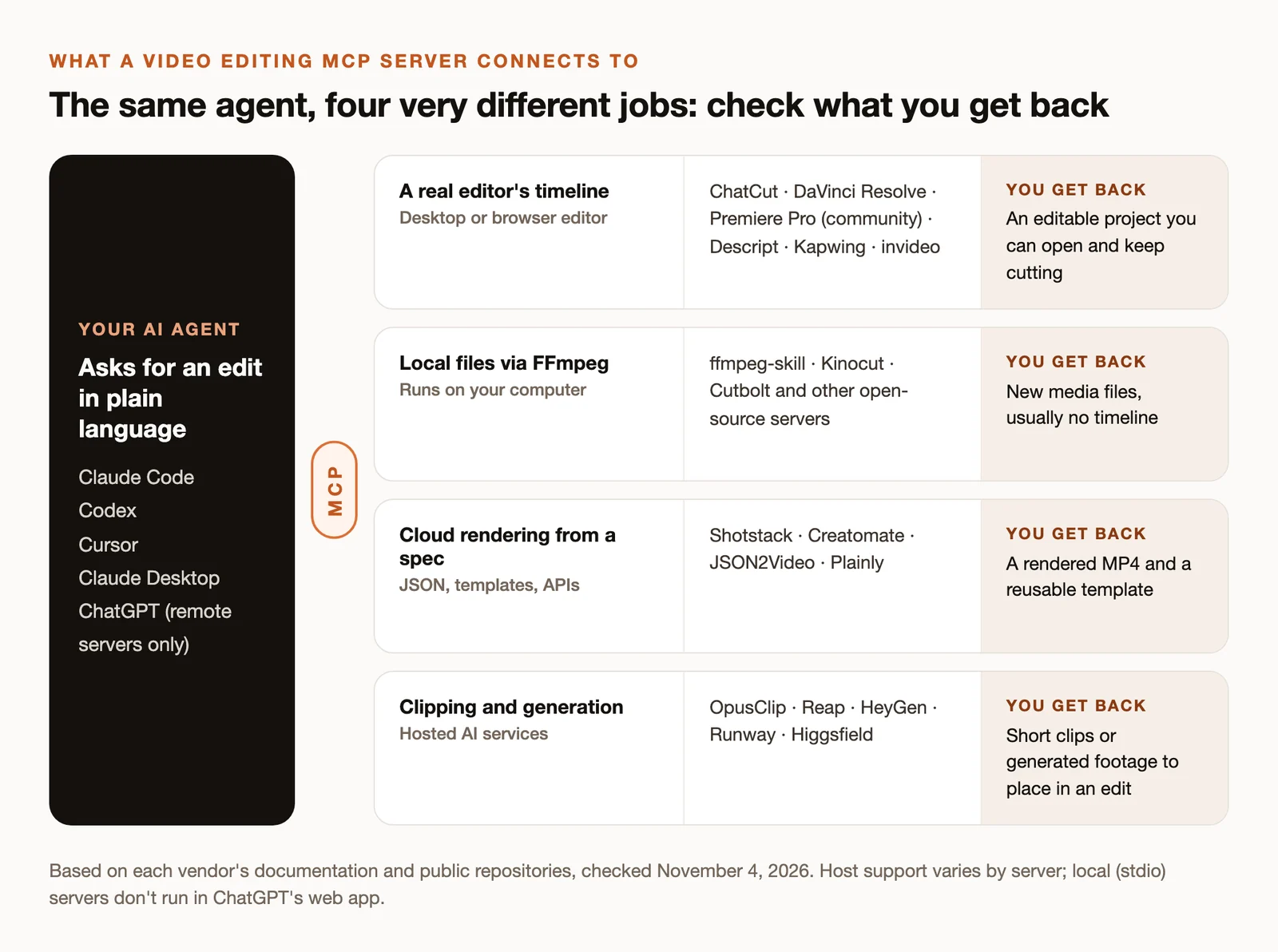
An MCP server lets an AI agent such as Claude Code, Codex or Cursor use another app’s tools. For video, that can mean very different things. One server edits a real timeline you can open and keep cutting. Another runs FFmpeg on files in a folder. Another sends a JSON description to a cloud renderer and returns an MP4. Another generates footage from a prompt.
They all get called “video editing MCP servers,” and choosing the wrong kind is the most common way to waste an afternoon. This guide sorts them by what actually gets edited, then compares the servers worth trying in each group, with the agents they support and what they cost to use. Everything below was checked against official documentation and public repositories on November 4, 2026.
Key Takeaways
- Decide first what you want back: an editable project, new media files, a rendered MP4, or generated clips. That picks the category.
- For editable timelines, look at ChatCut, DaVinci Resolve Studio’s built-in AI assistant connection, Descript, Kapwing and invideo. Premiere Pro has community bridges, not an official Adobe server.
- For local file processing, open-source FFmpeg servers like ffmpeg-skill and Kinocut are free to run, but they run commands on your computer.
- For repeatable templated video at scale, cloud renderers like Shotstack, Creatomate and JSON2Video fit better than an editor.
- Free source code isn’t free video: hosted services bill credits or render minutes, and your agent’s own plan pays for its reasoning.
Video Editing MCP Servers at a Glance
| Server | What it edits | Where it runs | Agents documented | Cost to use |
|---|---|---|---|---|
| ChatCut | Editable multi-track timeline, captions, graphics, generation | Local (Desktop) or hosted (Web) | Claude Code, Codex, WorkBuddy, other MCP agents | Free plan; paid from $25/month for generation |
| DaVinci Resolve Studio | Resolve projects, timelines, renders | Local | Claude, Claude Code, Codex (per Blackmagic) | Studio license, $295 one time |
| Descript | Descript projects: transcript edits, captions, reframing | Hosted | Claude, Claude Code, Cursor, ChatGPT, Codex | From $16/month billed annually |
| Kapwing | Cloud projects: captions, dubbing, exports | Hosted | Claude, Claude Code, Codex, ChatGPT | Free credits; Pro $16/month billed annually |
| invideo | Browser multitrack edits and generation | Hosted | Claude, Claude Code, Codex, Cursor, ChatGPT | From $20/seat/month |
| Premiere Pro bridges | Premiere timelines via a panel | Local | Claude Desktop, Claude Code, Codex, Cursor (varies by project) | Open source; Premiere subscription |
| ffmpeg-skill | Local media files | Local | Claude Desktop, Claude Code, Codex, Cursor | Free, MIT license |
| Shotstack | JSON timeline rendered in the cloud | Hosted | Claude, Claude Code, Codex, Cursor, ChatGPT | 10 free credits; from $39/month |
| Creatomate | Templates rendered in the cloud | Hosted | Claude, Claude Code, Codex, Cursor, ChatGPT | 50 trial credits; paid plans |
| OpusClip | Clips from long videos | Hosted | Claude, Claude Code, Codex, Cursor, ChatGPT | Pro $29/month or $14.50 billed annually |
“Agents documented” lists what each vendor or repository names; other MCP clients may work but aren’t promised.
How We Built This List
We started from what people search for (“video editing mcp”, “ffmpeg mcp”, “davinci resolve mcp”, “premiere pro mcp”), then checked 22 vendor MCP pages and 40 public repositories. For each, we recorded what it controls, how it installs, which agents its documentation names, its license and recent activity, and what it costs to use through MCP specifically. We didn’t install and benchmark every server, so this guide doesn’t rank output quality or speed. ChatCut publishes this guide and is one of the entries.
Servers That Edit a Real Timeline
Choose this group when you want to keep working on the result: open the project, fix a cut, change a caption, hand it to someone else.
ChatCut
ChatCut is an AI video editor whose desktop app runs a local MCP server for your agent. Your agent can import and organize media, inspect and cut the timeline, transcribe and caption, create and place motion graphics, generate images, video, voiceover, music and sound effects, and export finished media or an editable handoff for Premiere Pro or DaVinci Resolve. Everything lands in a ChatCut project you can open and edit by hand.
Setup: install ChatCut Desktop for macOS 13+ (Apple silicon or Intel) or Windows 10+; when it starts, it connects Claude Code, Codex, Hermes Agent and WorkBuddy to its local server, and Connect any agent covers other MCP clients. Or, in a new Claude Code or Codex conversation on that computer, send:
Sign in to ChatCut if it asks, then start a new conversation so the agent loads ChatCut’s tools. ChatCut can’t be installed inside the ChatGPT or Claude websites.
Cost: your agent’s own plan pays for its reasoning; ChatCut credits pay only for ChatCut-hosted generation. The free plan includes the editor, transcription, captions and up to 60 minutes of cloud exports; paid plans start at $25 a month or $252 a year. Local export goes up to 4K; cloud export to 1080p.
Watch for: ChatCut exports XML for Premiere Pro and DaVinci Resolve, not FCPXML, so it’s not a front end for Final Cut Pro.
DaVinci Resolve
On September 8, 2026, Blackmagic Design announced built-in AI assistant integration in DaVinci Resolve Studio 21.1, naming Claude, Claude Code and Codex. That’s the first official route for an agent to work with Resolve projects, timelines and renders.
Setup: in Resolve Studio 21.1 or later; follow Blackmagic’s setup for your assistant. The community davinci-resolve-mcp server (MIT, about 3,900 GitHub stars, updated November 2) predates it and covers timelines, Fusion and rendering through Resolve’s scripting API.
Cost: the native integration requires Resolve Studio, $295 one time (a $236 promotional price was showing when we checked). Community bridges historically relied on external scripting, which is a Studio feature; check each project’s notes before relying on the free version.
Descript
Descript’s MCP server is a hosted server at https://api.descript.com/v2/mcp, signed in with OAuth. Your agent can import and upload media, transcribe, ask Underlord for edits, add captions and reframe, then publish or share.
Agents: Claude, Claude Code, Cursor and ChatGPT, with Codex documented in Descript’s plugin repository.
Cost: Hobbyist is $24 a month, or $16 billed annually, with 1080p and no watermark; the free plan includes 60 media minutes a month at 720p.
Kapwing
Kapwing’s MCP server at https://www.kapwing.com/mcp works on editable cloud projects: captions, dubbing, uploads, exports and edits by Kapwing’s own assistant.
Agents: Claude, Claude Code, Codex and ChatGPT.
Cost: the free plan gives 10 credits with watermarked 720p exports up to four minutes, and some MCP imports and exports are restricted; Pro is $16 a month billed annually, with 4K and longer videos.
invideo
invideo’s MCP server at https://mcp.invideo.io/mcp reaches its browser editor: multitrack editing, media imports, transitions and effects, audio and color, and generation.
Agents: Claude, Claude Code, Codex, Cursor and ChatGPT. Cost: Starter is $20 per seat per month with 400 credits; an annual offer was showing when we checked.
Premiere Pro
There’s no official Adobe MCP server for Premiere Pro. Two active community projects control a real Premiere timeline through a panel inside the app:
- hetpatel-11/Adobe_Premiere_Pro_MCP: MIT, about 810 stars, updated October 24; documents Claude Desktop, Claude Code and Codex.
- leancoderkavy/premiere-pro-mcp: MIT, about 480 stars, updated November 3; documents Claude Desktop, Codex and Cursor. It’s a separate implementation with a different package name, so don’t mix their setup steps.
You still need a Premiere Pro subscription, and community bridges can break when Adobe updates the app.
Open-source editors with built-in MCP
FableCut and Cartcut are open-source editors that ship their own MCP servers, so your agent edits a timeline you can see in the app. They’re younger projects; expect rough edges.
One naming note: OpenChatCut is an independent open-source editor (AGPL-3.0). It isn’t made by or affiliated with ChatCut.
Servers That Process Local Files With FFmpeg
Choose this group for batch jobs on files in a folder: trim, convert, concatenate, burn captions, normalize loudness, reframe. You get new files, usually without a timeline to revisit.
- ffmpeg-skill (MIT, about 4,400 stars, updated October 31) is the most widely starred: a local FFmpeg toolkit with captions, reframing, loudness and project renders. It documents Claude Desktop, Claude Code, Codex and Cursor; the MCP server is configured separately from the
npx ffmpeg-skillinstaller. - Kinocut (Apache-2.0, updated November 3) adds project workflows and receipts that record what was run; install with
pip install kinocut. - Cutbolt (MIT) keeps a saved headless timeline with revisions and undo on top of FFmpeg, a middle ground between a script and an editor.
Watch for: local servers run commands with your user’s permissions. Install them from sources you trust, keep originals in a separate folder, and read what a tool will run before approving it.
Cloud Renderers: Video From a Spec
Choose this group for programmatic, repeatable video: the same template with different products, names or data, rendered hundreds of times. Your agent writes or fills a JSON description; the service renders an MP4.
- Shotstack at
https://mcp.shotstack.io/renders its JSON edit format and templates. All five major agents are documented. Pricing: 10 free credits, pay-as-you-go from $10 for 50 minutes, Starter $39 a month for 250 minutes at 1080p. - Creatomate at
https://api.creatomate.com/mcpcreates and updates templates and renders them, including free dry runs. 50 trial credits; downloads are kept 30 days. - JSON2Video offers a hosted server at
https://mcp.json2video.com/mcpand a local CLI. Free: 600 watermarked credits, at one credit per rendered second. - Plainly renders After Effects templates in the cloud through a local Node server with an API key. It doesn’t control your local copy of After Effects.
Clipping and Generation Services
These return clips or generated footage rather than an edited project. Use them alongside an editor.
- OpusClip at
https://mcp.opus.pro/mcpfinds clips in long videos, captions and reframes them, and can schedule posts. MCP access needs Pro, $29 a month or $14.50 billed annually, after a trial. - Reap at
https://mcp.reap.video/mcpdoes clipping, captions, reframing, dubbing and scheduling. - HeyGen exposes its Video Agent, avatars, translation and lip sync.
- Runway and Higgsfield expose image and video generation; Higgsfield also covers media edits and reference-video remakes.
How to Choose
- What do you need back? An editable project, new files, a rendered MP4 or generated clips.
- Where should the footage live? Local servers keep files on your machine; hosted servers upload them.
- Which agent do you use? ChatGPT’s web app connects to remote servers only. Desktop agents such as Claude Code, Codex and Cursor can also run local ones.
- What does MCP access cost? Check whether MCP is included in the plan you’d buy. Some services gate it to higher tiers.
- Can you undo it? Prefer tools that keep a project, a revision history or receipts of what ran, and test on copies first.
A good first test for any server: import one clip you own, trim one section, add captions, export, then reopen the project or file and check what you can still change.