A Mac can run every serious video editor except a few Windows-only ones, which makes the choice harder, not easier. The good news is that three of the best options are free, and the paid ones split cleanly by how you want to pay: once, or every month.
This guide compares eight editors by what you’re editing, what you want to spend, and what your Mac can run. If you’re here because iMovie stopped being enough, skip to which iMovie limit you’re hitting. Prices and requirements were checked on official pages on November 4, 2026.
Key Takeaways
- Start free. iMovie is already on your Mac, DaVinci Resolve’s free version handles professional editing and color up to 4K, and Shotcut is free and open source.
- Pay once if you’ll edit for years. Final Cut Pro is $299.99 one time and DaVinci Resolve Studio is $295; over three years both cost less than any subscription here.
- Pay monthly for specific workflows: Premiere for Adobe-based teams, CapCut for social templates, Descript and ChatCut for talking-head and transcript-led editing.
- Check your macOS version first. Final Cut Pro now needs macOS 15.6 or later; ChatCut runs on macOS 13 or later; some AI features need Apple silicon.
- Export one real project before you commit: watermarks and resolution caps show up there, not on feature pages.
Quick Picks
- Best free editor overall: DaVinci Resolve
- Best for beginners: iMovie
- Best one-time purchase: Final Cut Pro
- Best for teams already on Adobe: Adobe Premiere
- Best for social templates: CapCut
- Best free open-source option: Shotcut
- Best for podcasts and talking-head videos: Descript or ChatCut
- Best for turning long recordings into finished edits with an AI agent: ChatCut
Mac Video Editors Compared
| Editor | Best for | Mac requirements | Free version | Paid | Main limitation |
|---|---|---|---|---|---|
| iMovie | First projects, family and school videos | Current macOS from the App Store | Free | None | Limited layering; exports top out at 4K30 or 1080p60 |
| DaVinci Resolve | Editing, color and audio in one app | Mac, Windows or Linux | Free up to 3840 × 2160 at 60 fps | Studio $295 one time | Steeper learning curve; some AI tools are Studio-only |
| Final Cut Pro | Fast editing on Apple silicon | macOS 15.6+, 8 GB RAM (16 GB recommended) | 30-day trial via Creator Studio | $299.99 one time, or $12.99/month | Mac only; no Windows collaborators |
| Adobe Premiere | Teams on Adobe and Frame.io | Mac or Windows; Apple silicon recommended | 7-day trial | $22.99/month on an annual plan | Subscription only |
| CapCut | Social videos and templates | Mac, Windows, web, mobile | Basic editing and templates | $19.99/month or $179.99/year | Pro assets and some export settings need a subscription |
| Shotcut | Free multitrack editing | macOS 12 or later, Intel or Apple silicon | Free, open source | None | Plainer interface; 16 GB RAM advised for 4K |
| Descript | Editing video by editing text | macOS 14 or later | 60 media minutes/month at 720p | $16/month billed annually | Usage limits on media minutes and AI credits |
| ChatCut | Long recordings edited by an AI agent | macOS 13 or later, Apple silicon or Intel | Editor, transcription, captions; 60 min of cloud exports | $25/month or $252/year | Agent and generation use credits; no FCPXML export |
How We Chose
We looked at what people search for when they land on this page (mostly “best video editing software for mac”, “best free video editors for mac” and “best one time purchase video editor for mac”), the editors that recur across the guides ranking for those searches, and each editor’s official pricing, requirements and help pages.
This is a desk review, not a lab test. We didn’t time exports or benchmark Macs against each other, so you won’t find speed rankings here. Where a vendor doesn’t publish a limit, we say so. ChatCut publishes this guide and is one of the eight; it’s listed for the workflow it’s built for, not first.
The 8 Best Video Editors for Mac
1. iMovie: Best for beginners
iMovie is free from Apple and covers more than its reputation suggests: trimming, titles, transitions, stabilization, color adjustment, picture-in-picture and green screen, with position keyframes for picture-in-picture and audio keyframes. Projects can move to Final Cut Pro when you outgrow it.
Watch for: iMovie exports up to 4K at 30 fps or 1080p at 60 fps, and on a Mac the first clip you add sets the project’s format, so put your highest-quality clip in first. Beyond that, you’ll feel the limits as soon as you need several video layers, precise color work or custom motion graphics.
Price: free.
2. DaVinci Resolve: Best free editor overall
DaVinci Resolve, now version 21, puts editing, color grading, visual effects (Fusion) and audio post-production (Fairlight) in one app. It runs on Mac, Windows and Linux, which matters if you collaborate across platforms. The free version exports up to 3840 × 2160 at 60 fps.
Watch for: the learning curve is real; Resolve is organized around pages for each stage of post-production, and it rewards a few hours of tutorials. The AI tools built on Blackmagic’s Neural Engine, such as Magic Mask, text-based editing and advanced noise reduction, belong to the paid Studio version, and using Studio-only effects in the free version adds a watermark.
Price: free; Studio is $295 one time (Blackmagic was showing a $236 promotional price when we checked).
3. Final Cut Pro: Best one-time purchase
Final Cut Pro is Apple’s professional editor, built around the Magnetic Timeline, which keeps clips from drifting out of sync as you edit. It handles a wide range of professional codecs, includes captions, masking and automatic reframing, and imports iMovie projects. A separate iPad version exists.
Watch for: it’s Mac only, so it’s awkward if your collaborators are on Windows. The current version needs macOS 15.6 or later and 8 GB of RAM (16 GB recommended), and some features need Apple silicon. Check your Mac before you buy.
Price: $299.99 one time, or through Apple Creator Studio for $12.99 a month or $129 a year, with a 30-day trial. The one-time license equals about 23 months of the monthly plan, or about 2.3 years of the annual plan. If you’ll edit for longer than that, buy it outright.
4. Adobe Premiere: Best for Adobe teams
Adobe Premiere is the industry standard in many agencies and newsrooms. It has text-based editing, speech enhancement, AI masking and search, strong color tools, and tight links to After Effects, Photoshop and the Frame.io review platform, which is included in the plan.
Watch for: there is no ongoing free version, only a seven-day trial, and the lowest price assumes an annual commitment. Adobe’s technical requirements recommend Apple silicon for Macs; it runs natively on M-series chips.
Price: $22.99 a month on an annual plan, billed monthly.
5. CapCut: Best for social templates
CapCut runs on Mac, Windows, the web and phones, so you can start an edit on your phone and finish it on your Mac. Its templates, effects and caption styles are built for TikTok, Reels and Shorts.
Watch for: clean exports depend on using free assets. Pro effects and some templates block export without a subscription, and CapCut’s export help notes that some settings, including 4K at 60 fps, can need Pro. CapCut isn’t available in every country.
Price: free basic editing; Pro is $19.99 a month or $179.99 a year in the US, depending on your account and region.
6. Shotcut: Best free open-source editor
Shotcut is free and open source, with a multitrack timeline, wide format support, proxy editing, audio filters, and 4K and 8K support. It runs on macOS 12 and later on Intel and Apple silicon, as well as Windows and Linux.
Watch for: the interface is functional rather than polished, and Shotcut’s FAQ recommends 16 GB of RAM for 4K. It’s a good choice if you want a no-cost, no-account editor; it’s not the lightest app for an older Mac.
Price: free.
7. Descript: Best for podcasts and talking heads
Descript lets you edit video by editing its transcript: delete a sentence in the text and it disappears from the video. It adds filler-word removal, Studio Sound for voice cleanup, dynamic captions and Underlord, its AI co-editor.
Watch for: plans are built around media minutes and AI credits. The free plan includes 60 media minutes a month at 720p and 100 one-time AI credits; the Mac app needs macOS 14 or later.
Price: Hobbyist is $16 a month billed annually, or $24 month to month, with 1080p exports; 4K needs the Creator plan.
8. ChatCut: Best for AI agent editing
ChatCut is an AI video editor where you describe the edit and an agent makes it on a real multi-track timeline that you can keep editing by hand. It’s built for the long, messy recordings that take the most time: interviews, podcasts, lectures, product demos. Ask for a 10-minute cut without the retakes, five vertical clips with captions, or a version with B-roll over every example, then review and adjust.
ChatCut Desktop runs natively on macOS 13 or later on Apple silicon and Intel Macs, works with local files and folders, and renders on your Mac, including 4K and HDR on supported hardware. It can also hand projects to Premiere or DaVinci Resolve as XML, and you can drive it from Claude Code or Codex through the Agent Plugin. A web app runs in a desktop browser.
Watch for: requests to the built-in agent and AI generation use credits. ChatCut exports XML for Premiere and Resolve but not FCPXML, so it isn’t a front end for Final Cut Pro. It needs an internet connection for sign-in and AI features.
Price: the free plan includes the editor, transcription, captions and up to 60 minutes of cloud exports in total; paid plans start at $25 a month or $252 a year with 100 credits a month.
Also worth a look
- Filmora has a friendly timeline, effects and screen recording, and offers both annual plans and a perpetual license on Mac, but its official storefronts showed different prices when we checked, and the free trial watermarks exports.
- PowerDirector for Mac is $79.99 a year or $24.99 a month, with multicam and masking. There’s no perpetual license on Mac.
What These Editors Cost Over Three Years
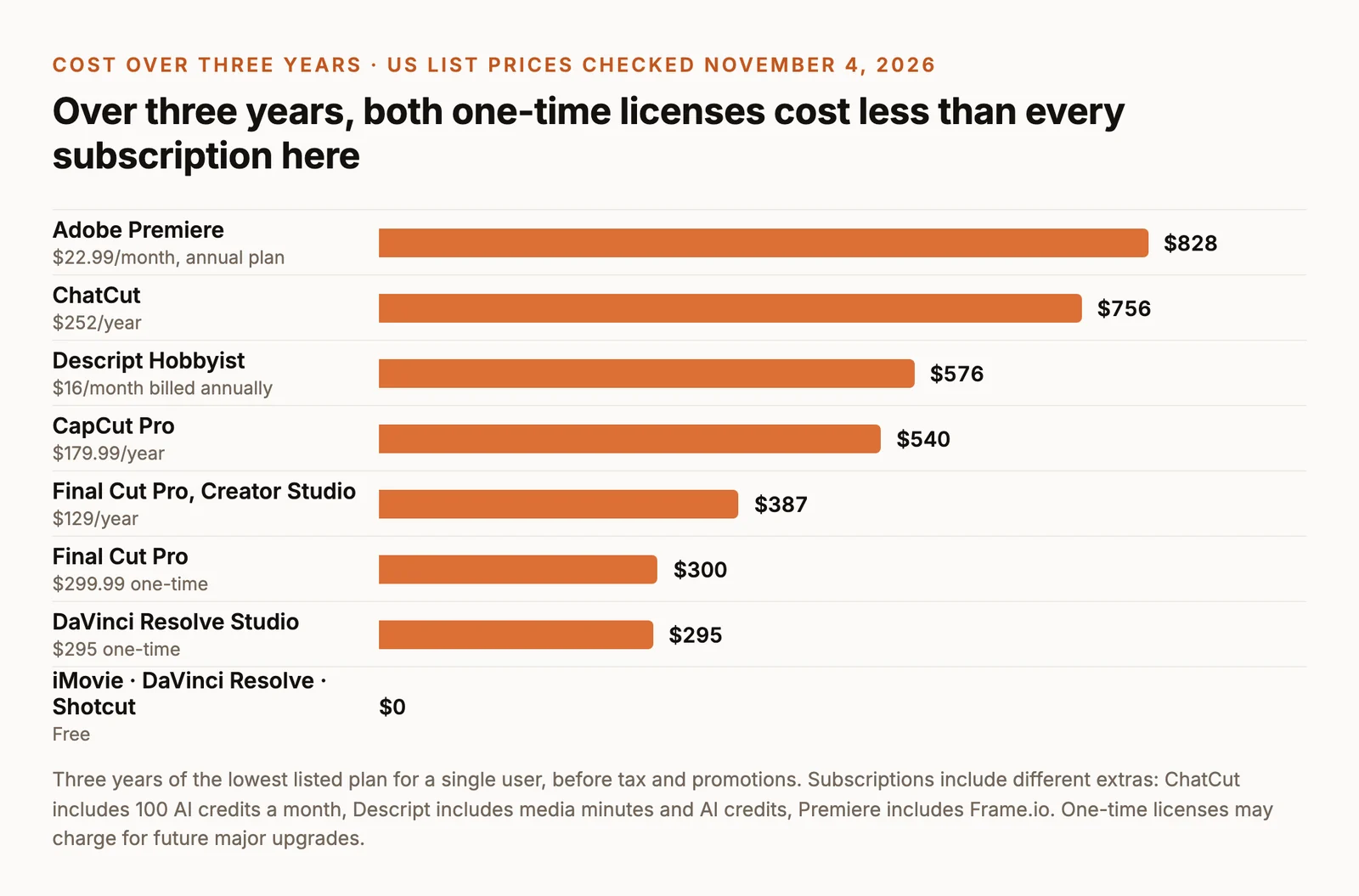
The chart answers the most common money question: is a one-time license worth it? For Final Cut Pro, the $299.99 license costs less than the Creator Studio subscription after about two years and four months. DaVinci Resolve Studio is the same idea for the free Resolve you may already use.
Subscriptions earn their price when they include something you’d otherwise pay for: Premiere’s place in an Adobe workflow and Frame.io reviews, CapCut’s Pro templates, or the AI credits in Descript and ChatCut that replace hours of manual cutting. Compare the extras, not only the totals.
Leaving iMovie? Pick by the Limit You Hit
Most people outgrow iMovie for one specific reason. Name yours, and the next editor is usually obvious.
- You need more layers, precise color or audio mixing. Move to DaVinci Resolve for free, or Final Cut Pro if you want the closest thing to a grown-up iMovie: Final Cut opens iMovie projects directly.
- You make social videos and want templates and trendy captions. CapCut, with the free-asset caveat above.
- Your videos are mostly people talking. Descript or ChatCut. Both let you edit from the transcript; ChatCut adds an agent that can make the whole first cut from a description.
- You want free and open source, with no account. Shotcut.
- You need to share projects with someone on Windows. DaVinci Resolve, Premiere, CapCut or Shotcut. Avoid Final Cut Pro.
Whichever you choose, keep iMovie for quick jobs. It’s still the fastest way to trim a clip and send it.
Check Your Mac Before You Commit
- Check your macOS version in Apple menu → About This Mac. Final Cut Pro needs macOS 15.6 or later, Descript needs macOS 14, ChatCut needs macOS 13 and Shotcut supports macOS 12 onward.
- Check memory. Final Cut Pro needs 8 GB and recommends 16 GB; Shotcut recommends 16 GB for 4K. More memory helps with long timelines and effects in every editor.
- Export a real project in the trial or free version. Use your own footage, your usual length, and the resolution you’ll publish. Look for a watermark, a resolution cap or a missing effect in the final file, not in the preview.
- Check how you’ll hand off. If an editor or client uses Premiere, Resolve or Final Cut, confirm the project format you can export before you build a workflow around it.
Edit a Long Recording on Your Mac With ChatCut
If most of your time goes into cutting long talking-head footage, try this as a first pass. Run it in ChatCut Desktop, or from Claude Code or Codex with the ChatCut plugin:
Then review the cut, fix anything that changed the meaning, and export locally in 4K if your footage supports it. For a broader comparison across platforms, see the best AI video editors.